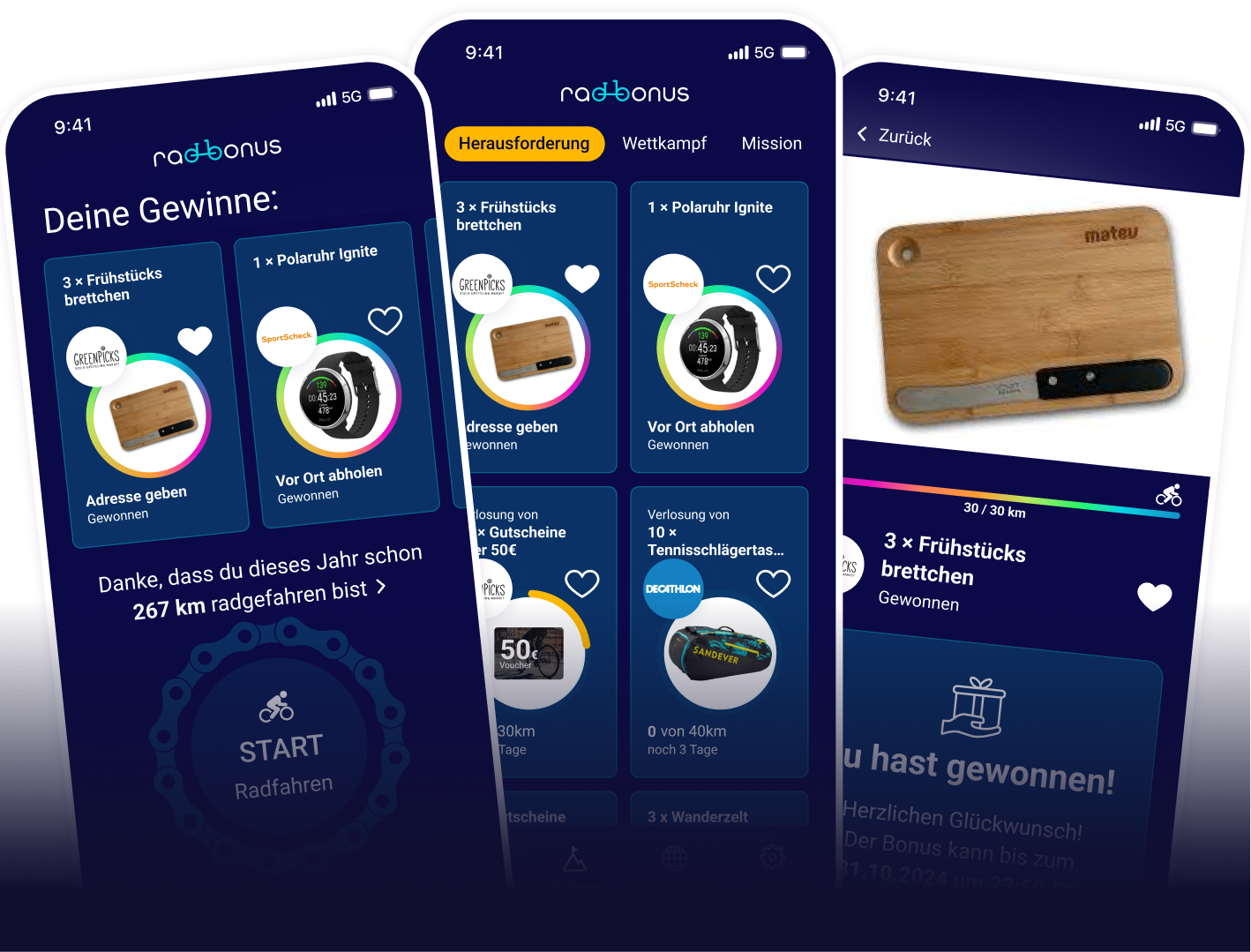
In the Recording tab, tap the big START button and ride off. When you arrive, tap STOP — your ride will be saved automatically. Even easier: connect Radbonus once to Apple Health, Google Health Connect, or Strava (see the next section). Then we’ll automatically import your rides as soon as you’ve recorded them with your favorite tracking app — you’ll never have to press Start yourself again.
Depending on your device, there can be different reasons for this. If none of the info below fits your situation, please write to us from the app: in the Recording tab (Home tab), you’ll find a chat icon labeled "Help" to the right of the big Start button (in the lower third of the screen) — tapping it opens a direct line to us. The needed info is filled in automatically, so you don’t have to write everything out for us! We’re happy to add any missing kilometers for you!
Location permission "Always": First, it’s important to set location permission to "Always." "Always" simply means Radbonus can also record your location when the app is running in the background and your phone screen is off. Of course, this setting does not mean the app records your location when it’s closed or if you never tapped Start at all. So check your phone’s settings to make sure you’ve set location permission to "Always" for the Radbonus app so tracking works!
Battery settings on Android phones: On Android devices, the most common cause is that the app doesn’t keep running in the background and is simply closed by your phone as soon as you turn off the screen. Android probably does this, without you knowing, to optimize battery life. To prevent that, you should turn off adaptive battery and enable background usage for Radbonus. We’ll gladly give you the right instructions for your operating system. Just send us a short message via the "Help" chat icon in the Recording tab. The needed info is filled in automatically, so you don’t have to write everything out for us!
No, a permanent internet connection isn’t needed for tracking itself. An internet connection is only needed to send the data. If you tap Stop at the end of your ride and you don’t have internet, the app will simply send the data later once you’re back online and turn it on!
But beware — accuracy suffers without internet: Modern smartphones can determine your location much faster and more precisely if they can pull small helper data from the internet in the background (this is called Assisted GPS, or A-GPS for short). Without internet, tracking still works — but with a few limitations:
Our recommendation: keep mobile data on for a clean recording (it only uses a few kilobytes). If you’re riding abroad or intentionally in airplane mode, just be aware that the start and tricky spots will be recorded less precisely — the app usually smooths out small glitches, but unfortunately we can’t work miracles.
Yes, worldwide! Tracking works even without data roaming.
No, usually not. As long as you tapped START before the ride, the app keeps saving the ongoing recording locally on your phone in the background — even if the screen is off and you’re doing something else. As soon as you charge your phone again and open Radbonus, the missing data will be sent automatically.
What the app can’t do by itself if the battery died completely: end the ride cleanly — it doesn’t know where your STOP would have been. If your ride doesn’t show up at all or only partially, just get in touch using the "Help" chat icon, and we’ll add the missing kilometers manually.
If you’re currently recording a ride with Radbonus, you can see a small live display on your iPhone lock screen and in the Dynamic Island (at the top of the screen) — it shows you distance and time in real time during your ride. As soon as you tap STOP or fully close the app, the display disappears again.
Turn it on manually if you denied the prompt? Yes: go to iPhone Settings → "Notifications" → "Radbonus" and enable "Allow Live Activities" there. If the display still doesn’t appear, also check under "Face ID & Passcode" (or "Touch ID & Passcode") whether "Live Activities" are allowed on the lock screen.
iPhone only or Android too? Right now, this is an iPhone-only feature (from iOS 16.1). On Android, there’s still no comparable system feature that we can reliably use — as soon as that changes, we’ll follow along.
Yes — the app uses your movement profile to detect whether a ride fits a bike. If something looks suspiciously like a car, bus, or train, the kilometers for that ride won’t be counted. In rare cases, unusual riding behavior can trigger this filter by mistake. If that happens to you even though you really were biking, message us through the "Help" chat icon in the Recording tab — we’ll take a close look and credit the kilometers afterward!
Don’t worry — a fast downhill ride on its own won’t make you look like you’re in a car. The app looks at the route profile and understands that high speeds while going downhill are totally normal. The filter only kicks in on flat stretches when your speed and acceleration no longer fit a bike — then the kilometers for that section won’t be counted.
If a ride is still mistakenly detected as a car trip, please message us through the "Help" chat icon in the Recording tab, and we’ll review the recording in detail and credit the missing kilometers.
Three direct data sources — all available in Radbonus settings under "DATA EXCHANGE":
There’s no direct connection with Garmin or Wahoo — they go through Apple Health or Health Connect, which works in practice because their apps write there by default.
What if this Strava account was already linked once? Starting with app version 2.1, Radbonus recognizes that automatically and gives you the option to restore your old account — including all missions, rewards, and battle participations. You won't lose a ride.
There are several ways your rides get into Radbonus:
You can connect Radbonus in parallel with Apple Health, Strava, and (on Android) Health Connect — we automatically detect duplicate rides and count each ride only once. Specifically:
What you do not need to worry about: whether you’re currently "tracking twice". Record your ride with the app you like best — Radbonus will sort it out for you.
What you still should not do: press START in Radbonus at the same time AND record in parallel with Strava / Komoot / Garmin. We do detect duplicates — but it wastes battery for no reason and can mess up your recording in multiple apps. Pick one source per ride.
Only:
The following are not read: steps, sleep data, heart rate data, weight data, nutrition data, other sports, activity rings, medical data, or any other Health content. Apple Health and Health Connect show you exactly what Radbonus is requesting before each permission — if you deny one of the permissions, only the corresponding function in Radbonus is missing, and everything else keeps working. In the Health Connect or Apple Health app, you can revoke any access at any time.
In a challenge, you ride the required number of kilometers on your own within the given time frame. As a reward, you can win great products and discounts. Some of them are raffled off at the end of the challenge among everyone who reached the required kilometers. Others are guaranteed as soon as you hit the distance. You can read the exact conditions on the challenge’s detail page.
You automatically take part in all challenges when you track your kilometers, so you do not need to choose one separately.
As soon as you’re one of the lucky winners of a challenge, we’ll send you a win notification in the Radbonus app with all the details. After that, you’ll have a few days to get back to us. So please make sure to activate “Push notifications for prizes" in the app settings so you don’t accidentally miss the reply deadline!
Many prizes are stored directly in the app as a voucher code, so you can see it there and redeem it right away. If you win, you’ll find the exact redemption info on the challenge’s detail page in the app.
We’re very sorry something went wrong with your bonus. Of course, that should not happen! In this case, feel free to contact our customer service via the “Help" chat icon in the Recording tab (to the right of the big Start button) — we’ll sort it out as quickly as possible.
Unfortunately not. Of course we do not want any prize to expire, so once the reply deadline has passed, we pass the prize on to someone else.
In a mission, all members of a World ride together to reach a bigger goal with their combined kilometers — typically a donation for a social project or an environmental protection measure. The sponsoring company or city decides in advance how much is added to the pot per kilometer ridden. You do not need to sign up separately for missions — they run automatically alongside your regular recordings, and mission progress is shown on the detail page.
In the Radbonus app, you have the option to take part in 2 different types of Battles:
Individual Battle: All participating cyclists battle it out and ride for the top spots. There is a public Individual Battle and exclusive Battles that are only for partner participants. You’ll get the matching access code from the partner. Enter the access code in the app and let’s go. In the Battle detail view, you also have the option to check your rankings.
Team Battle: Ride in a team for the top spots and secure great bonuses and rewards with your team! Here too, you can check your placement in the team ranking on the Battle detail page.
If an access code is linked to choosing a team, you should make that choice too. Otherwise, your kilometers count only for you and not for your team in the Battle, and that would be a shame.
First, the important background — where does your Radbonus ID live on the device?
Manual restore — works on both platforms as soon as you know your old Radbonus ID:
Each time the app is reinstalled, a new anonymous Radbonus ID is assigned first. To restore your old account, please first update to the latest Radbonus version.
Then go to the **### I lost my old Radbonus ID. Can I still access my old account after changing phones?
If you still have your old phone handy, you can see your Radbonus ID in Settings right on the first item, “Radbonus ID, Nickname, Bike.”
If you no longer have your old phone with the Radbonus app on it, please contact our customer service: ideally directly from the app via the “Help” chat icon in the Recording tab. If you can no longer get into the app, feel free to write to us at support@radbonus.com.
Please share this information with us — whichever of these apply to you or you still know. Based on this info, we'll find your account:
Everything about privacy — what we store, what we don't store, what goes to cooperation partners, how long which data is kept, and your rights to access and delete — you'll find directly in the app under:
Settings → “Privacy”
That's where you'll find everything explained clearly and up to date. We intentionally don't keep this in the FAQ at the same time, because legal requirements and our actual data processing sometimes change — and the in-app privacy page is the authoritative source. If you want the full legal version, the privacy policy is linked there too.
Which data goes to the organizer in your specific world (employer, city, club, …) is shown in the app under Settings → Privacy. There you'll find the details that apply to your active world — we don't maintain that here in the FAQ so you always see the binding, current version.
Of course we're really sorry if you no longer want to be part of our Radbonus community! You can delete it yourself anytime under:
Settings → “Radbonus ID, Nickname, Bike” → “Delete account”
After confirmation, we'll delete your account including your Radbonus ID and nickname. For the kilometers you've collected so far, your Radbonus ID will simply be removed — the kilometers themselves stay in place for your team, your world, and your contributions to challenges, just no longer linked to your ID.
The Radbonus app runs on the current operating systems from Android (Google) and iOS (Apple).
Currently, 14 languages are fully translated:
German · English · French · Spanish · Italian · Luxembourgish · Polish · Czech · Slovak · Slovenian · Croatian · Hungarian · Romanian · Bulgarian.
The app language automatically follows your device’s language settings. If your phone is set to "German", for example, you’ll see Radbonus in German. If your language isn’t supported yet, the app falls back to English. You can change the language anytime in your phone’s Settings — Radbonus picks that up without a restart.
Companies, cities, or other partner organizations can launch exclusive Challenges that only users with a special access code can join. You can enter the access code either right when you first open the app or add it later anytime: as long as you’re still in the public world, you’ll find the "Access code" tab in the bottom navigation bar — tap it to open the entry screen.
You get the access code directly from the partner offering it — for example, from your employer, your city, or the organizer of a campaign. You’ll usually be informed by email, poster, or an intranet message. If you’re looking for the code and don’t know where it should be, ask the place you got the invitation from directly — we at Radbonus don’t hand out codes ourselves; we only provide the platform.
The bike type has no effect on how your kilometers are scored. It’s only there for transparency in the Battles: after all, it’s nice to know whether you passed an e-bike rider or a road bike, or whether you’re fighting for a spot against a mountain biker. Adding a bike type is of course not mandatory — it’s completely voluntary.
In Battles, your nickname is shown in the rankings, making your placement easier for the other participants to see than it would be with your Radbonus ID.
A short, punchy nickname is also easier to remember than a 32-digit number, and it still reveals nothing about you. By entering a nickname, we can also find you more easily if you lose your Radbonus ID, for example so we can assign your kilometers back to you if you change phones or reinstall the app. Of course, you do not have to enter a nickname if you do not want to — it is completely optional.
Please note our nickname guidelines. To keep the ranking a pleasant place for everyone, please make sure your nickname does not contain:
We may remove violations without warning — if your nickname repeatedly breaks the guidelines, we reserve the right to suspend your account.
Directly in the app: in the Recording tab (home screen), you’ll find a chat icon with the label "Help" — to the right of the big Start button (in the lower third of the screen). Tap it to open the help and support chat. You’ll get a reply in no time, and the device info useful for diagnosing the issue is sent automatically, so you do not need to look anything up yourself. If you can’t get back into the app anymore, feel free to email us at support@radbonus.com.
To participate, record your cycled kilometers with the Radbonus app. With these cycling km, you automatically participate in the challenges described above. Great bonuses await you!